はじめに
こんにちは、sawa です。
最近 AI 系のサービスにハマっており、Strands Agents に TypeScript SDK のプレビューが公開されたということで、いくつか検証を進めています。
今回は、その中でも「ツールの作成と実行」にフォーカスして触ってみたいと思います。
Strands Agents の TypeScript SDK(プレビュー)でツールを定義し、エージェントがそれを選択・実行する流れを、最小構成のコードで確認していきます。
Python SDK とは記述方法も異なるため、TypeScript SDK ではどのような実装になるのかを見ていきましょう。
セットアップ
前回のブログで Strands Agents の TypeScript SDK を動かせるように準備したのでこちらをご覧ください。
TypeScript SDK のツール定義の例
Strands Agents の TypeScript SDK でツールを定義は以下のように行います。
import { Agent, tool } from '@strands-agents/sdk'
import z from 'zod'

// デモ用ツール
const demoTool = tool({
    name: 'demo', // LLM がツールを識別するための一意の名前
    description: 'デモ実行用のツール', // ツールの説明
    inputSchema: z.object({ // ツールに渡すプロパティを定義
        name: z.string(),
        id : z.number()
    }),
    callback: (input) => { // ツールの処理を記述
    return `demo tool. ${input.name}`
  },
})

const agent = new Agent({
    tools:[demoTool], // ツールをリストで渡す
    model: 'amazon.nova-lite-v1:0' // モデルの指定
});

await agent.invoke('デモを実行して') // AI エージェントがタスクを実行
これで AI エージェントにツールを渡し、ユーザーの指示に応じてエージェントが適切なツールを選択・実行できるようになります。
ここで使用している zod は、入力データの構造を定義し、実行時に検証を行うための TypeScript 向けスキーマ定義ライブラリです。
zod については以下のリファレンスをご覧ください。
予定管理 AI エージェントの作成(簡易実装)
色々触ってみるとやはりどこかで活用できそうなツールをもつ AI エージェントを実装してみたくなるものです。
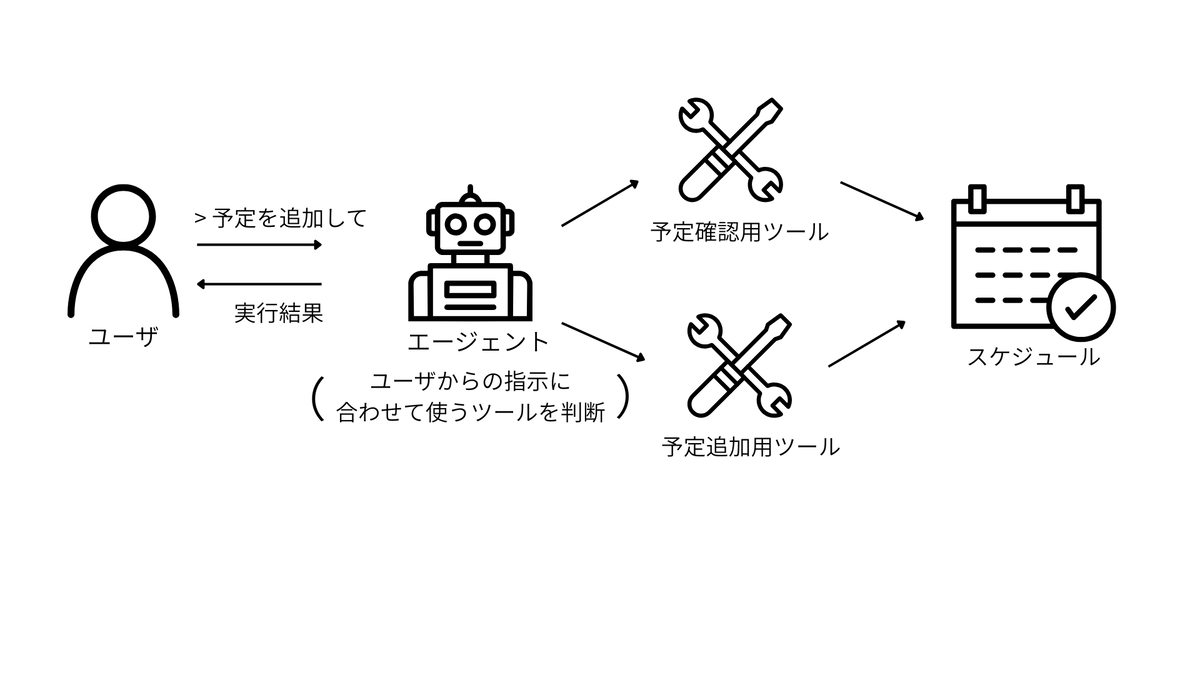
ということで今回は予定を追加、管理してくれる AI エージェントを試しに作成してみました。
作成する AI エージェントの概要
今回作成する AI エージェントを図にしてみました。
実際のコード
今回は以下のように非常に簡易的に実装をしてみました。
toolAgent.ts
import { Agent, tool } from '@strands-agents/sdk'
import z from 'zod'

// スケジュールの型を定義
interface Schedule {
    date: string;
    title: string;
}

// スケジュールを持つリストを定義
const schedules: Schedule[] = [{
    date: '2026-01-10',
    title: 'ミーティング'
}]

// 指定した日付のスケジュールを確認するツール
const checkScheduleTool = tool({
    name: 'check_schedule',
    description: 'Check the schedule for the specified date',
    inputSchema: z.object({
        date: z.string().describe('The date of schedule'),
    }),
    callback: (input) => {
        // 指定した日付と一致する予定を抽出
        const checkDateResult = schedules.filter(s =>
                s.date == input.date
            )
        // リストの要素が 0 なら予定なし
        if(checkDateResult.length === 0){
            return `No schedule found for ${input.date}`
        }

    return `I already have a schedule for ${input.date}`
  },
})

// 指定した日付に予定を追加するツール
const addScheduleTool = tool({
    name: 'add_schedule',
    description: 'Add a schedule on the specified date',
    inputSchema: z.object({
        date: z.string().describe('The date of schedule'),
        title: z.string().describe('The title of schedule')
    }),
    callback: (input) => {
        const schedule = {
            date: input.date,
            title: input.title,
        }
        // 予定の追加
        schedules.push(schedule)

    return `I scheduled a ${input.title} for the ${input.date}`
  },
})

// エージェントの定義
const agent = new Agent({
    tools:[checkScheduleTool, addScheduleTool],
    model: 'amazon.nova-lite-v1:0'
});

// 実行
await agent.invoke("2026年1月7日に美容院の予定をいれて")
await agent.invoke("2026年1月10日の予定が空いているか教えて")
では、このコードを実行してみます。
実行コマンド
npx tsx toolAgent.ts
実行結果(ツール選択と実行ログ)
<thinking>The User wants to schedule an appointment at a beauty salon for January 7, 2026. I need to use the 'add_schedule' tool to accomplish this. The required arguments are 'date' and 'title'.</thinking>

🔧 Tool #1: add_schedule
✓ Tool completed
<thinking>I successfully used the 'add_schedule' tool to schedule a beauty salon appointment for January 7, 2026. I should now inform the User of the successful scheduling.</thinking>

I have successfully scheduled a beauty salon appointment for January 7, 2026. Is there anything else you would like to add to your schedule?<thinking>The User wants to check if there is any schedule for January 7, 2026. I need to use the 'check_schedule' tool to accomplish this. The required argument is 'date'.</thinking>
🔧 Tool #2: check_schedule
✓ Tool completed
<thinking>I successfully used the 'check_schedule' tool and found out that there is already a schedule for January 7, 2026. I should now inform the User of the schedule.</thinking>
うーん、何言ってるかわからん!
ということで翻訳してみました。
<thinking>ユーザーは2026年1月7日に美容院の予約をスケジュールしたいと考えています。これを実現するには「add_schedule」ツールを使用する必要があります。必要な引数は「date」と「title」です。</thinking>

🔧 ツール #1: add_schedule
✓ ツール完了
<thinking>「add_schedule」ツールを使用して、2026年1月7日の美容院予約を正常にスケジュールしました。ユーザーに予約成功を通知する必要があります。</thinking>

2026年1月7日の美容院予約を正常にスケジュールしました。他にスケジュールに追加したいことはありますか?<thinking>ユーザーは2026年1月7日に予約があるか確認したいようです。これを実現するには「check_schedule」ツールを使用する必要があります。必要な引数は「date」です。</thinking>
🔧 ツール #2: check_schedule
✓ ツール完了
<thinking>「check_schedule」ツールを正常に使用し、2026年1月7日に既に予約が入っていることを確認しました。ユーザーにこの予約内容を通知する必要があります。</thinking>
おぉ、ちゃんとツールを使ってタスクを実行してくれています!
さいごに
いかがだったでしょうか?
Strands Agents の TypeScript SDK はまだプレビュー版のため、基本的な機能は使用できますが、一部の機能は未サポートとなっています。(2026年1月現在)
Python の SDK と比較して記述方法も異なりますが、TypeScript のサポート開始によって間口は大きく広がったと思います。
今回はツール実行にフォーカスしましたが、Strands Agents の TypeScript SDK でこれからも遊んでいきたいと思います。